We may earn a commission when you buy through links on this page, at no extra cost to you. How this works.
Right-sizing a battery backup system starts with one essential number: total watt-hours of capacity you actually need. Without that figure, you risk buying too little storage and losing power mid-outage, or overspending on capacity you'll never use. This guide walks through the four-step process to calculate your home backup power needs in watt-hours, whether you're planning for a portable power station, a modular home battery, or a grid-tied solar-plus-storage system.
You'll learn how to inventory the appliances and devices you want to keep running, estimate realistic runtime for each, account for inverter efficiency and surge loads, and add headroom for battery chemistry limits. The method applies to any lithium or lead-acid battery system; we focus exclusively on the math for battery capacity, not generator sizing, fuel calculations, or whole-home automatic transfer switch design.
By the end, you'll have a watt-hour target that reflects your actual usage patterns and the margin needed to avoid deep discharge or unexpected shutdowns. Use that number to compare spec sheets with confidence and match your budget to real backup requirements, not guesswork.
Who This Calculation Method Is For
This calculation method is designed for homeowners and renters sizing portable power stations, battery backup systems, or solar generator setups measured in watt-hours. If you're comparing product spec sheets to your actual runtime needs - whether for storm preparedness, off-grid living, or keeping essential devices online during outages - this approach helps you match battery capacity to real-world demand.
Remote workers who depend on internet routers, modems, and laptops will find this method useful for estimating uptime between charges. Anyone shopping for lithium battery systems and trying to translate manufacturer capacity ratings into hours of backup for specific appliances will benefit from learning to calculate in watt-hours.
This guide focuses exclusively on DC battery systems where capacity is expressed in watt-hours or amp-hours, not fuel-powered generators measured in runtime per gallon or grid-tied solar inverters that feed power back to the utility. If your backup solution stores energy in a battery and you need to know how long that stored energy will last under your load, this method applies.
The steps work equally well for small portable units in the 300 Wh range and larger home battery banks exceeding 3,000 Wh, as long as the system discharges stored DC power through an inverter or direct DC outlets.
What Watt-Hours Actually Measure
Watt-hours measure total energy capacity - the amount of work a battery or power station can deliver over time. Unlike watts, which describe instantaneous power draw at a single moment, watt-hours account for both the power level and the duration: multiply the wattage of a device by the hours it runs, and you get watt-hours consumed. A 100-watt light bulb running for five hours uses 500 watt-hours; the same bulb running ten hours consumes 1,000 watt-hours.
This distinction matters when sizing backup power. A portable battery might list a 2,000-watt inverter rating - the maximum instantaneous load it can handle - but only 1,500 watt-hours of stored energy. That capacity tells you how long your devices will actually run before the battery depletes. If you plug in appliances drawing a combined 300 watts, a 1,500Wh battery will theoretically supply power for five hours, though real-world efficiency losses typically reduce that figure by ten to twenty percent.
Amp-hours, another common specification, require voltage to convert into watt-hours. Multiply amp-hours by the battery's nominal voltage to arrive at watt-hours: a 12-volt battery rated at 100Ah holds approximately 1,200 watt-hours. Because voltage varies across battery chemistries and configurations - 12V, 24V, 48V, and higher - watt-hours offer a consistent unit for comparing capacity across different systems. When planning backup power, start with watt-hours to match your appliance loads and desired runtimes, then verify the inverter wattage can handle peak startup surges.
Step 2: Measure Actual Draw with a Watt Meter
Nameplate ratings on appliances often list the maximum possible draw, which can be significantly higher than what the device uses during typical operation. A refrigerator labeled 800 W might average only 150 - 200 W when running, and a laptop charger rated for 65 W may pull just 30 - 40 W during normal use. Relying on nameplate figures alone will lead you to oversize your backup battery - and overspend.
A plug-in watt meter gives you real-time consumption data for any 120 V appliance. Plug the meter into the wall outlet, connect your appliance to the meter, and run the device through its normal cycle. Watch the display for both steady-state watts and any startup surge. For devices with compressors or motors - refrigerators, air conditioners, sump pumps - note the initial spike, then record the running wattage once it stabilizes. For electronics and lighting, a single steady reading is usually sufficient.
Measure each appliance you plan to back up during a typical use scenario: the refrigerator while it's cooling, the microwave while heating food, the TV while streaming. Write down the running watts and any surge you observe. If an appliance cycles on and off, measure over several minutes and note the average. These real-world numbers will form the foundation of your load calculation and help you size your battery capacity accurately without the guesswork that nameplate data introduces.
Step 3: Calculate Total Watt-Hours per Day
Multiply each appliance's wattage by the number of hours you expect to run it per day to find its daily watt-hour requirement. This simple formula - watts × hours = watt-hours - is the foundation of sizing any backup power system.
For example, a refrigerator rated at 150 watts that runs 8 hours per day consumes 1,200 watt-hours (150 W × 8 h = 1,200 Wh). A laptop drawing 60 watts for 6 hours uses 360 watt-hours (60 W × 6 h = 360 Wh). Two LED bulbs at 10 watts each, running 4 hours, total 80 watt-hours (20 W × 4 h = 80 Wh). A modem and router drawing 15 watts continuously for 24 hours require 360 watt-hours (15 W × 24 h = 360 Wh). A microwave rated at 1,000 watts used for 0.5 hours adds 500 watt-hours (1,000 W × 0.5 h = 500 Wh). Add these together to estimate your daily total: in this case, 2,500 watt-hours per day.
Keep in mind that cycling loads like refrigerators and air conditioners do not draw power continuously. A refrigerator may be rated at 150 watts but only run about one-third of the time to maintain temperature, meaning the actual runtime is closer to 8 hours in a 24-hour period rather than 24 hours straight. This on-off pattern is called the duty cycle, and it significantly lowers the daily watt-hour total compared to a continuous load. Check the appliance's energy guide label or measure actual runtime with a plug-in meter if you need precision.
Once you have calculated watt-hours for each device, sum them to determine your total daily energy requirement. This number tells you the minimum battery capacity you need to sustain your chosen loads for one day, before accounting for inverter efficiency or reserve margin.
Step 4: Add Overhead and Efficiency Losses
After summing your appliance loads and runtime targets, the next step is to account for real-world efficiency losses that occur between your battery and your devices. Inverters - which convert DC battery power to AC household current - typically operate at 85 - 90% efficiency, meaning 10 - 15% of stored energy becomes heat rather than usable power. To ensure you have enough capacity, multiply your calculated watt-hour total by 1.15. For example, if your essential loads require 5,000 Wh, budget for at least 5,750 Wh to cover inverter conversion losses.
Battery longevity also depends on how deeply you discharge the cells during each cycle. Lithium iron phosphate (LiFePO4) batteries can safely deliver approximately 80% of their rated capacity without accelerating degradation, while lead-acid chemistries should only be discharged to 50% to preserve cycle life. Divide your inverter-adjusted total by the usable depth of discharge to find the minimum rated capacity. Using the 5,750 Wh example, a LiFePO4 system would need a rated capacity of 7,188 Wh (5,750 ÷ 0.80), while a lead-acid bank would require 11,500 Wh (5,750 ÷ 0.50). This two-step adjustment - first for inverter loss, then for depth of discharge - gives you a reliable minimum battery size that balances performance with longevity.
Keep in mind that adding a small buffer beyond this minimum improves flexibility during extended outages or unexpectedly high loads. A 10 - 20% margin accounts for temperature effects, aging batteries, and occasional peak draws that exceed your baseline estimate, ensuring your backup system remains capable over time.
Worked Example: 24-Hour Home Office Backup
A home office backup scenario offers a clear example of how to translate device loads into battery capacity. Start with four devices: a laptop drawing 45 watts for 8 hours, a monitor at 30 watts for 8 hours, a router at 10 watts running continuously for 24 hours, and an LED desk lamp at 12 watts for 6 hours.
Calculate the watt-hour requirement for each device by multiplying power by runtime. The laptop needs 45 W × 8 h = 360 Wh. The monitor needs 30 W × 8 h = 240 Wh. The router needs 10 W × 24 h = 240 Wh. The desk lamp needs 12 W × 6 h = 72 Wh. Add these together to reach a raw total of 912 watt-hours.
Inverter losses typically range from 10 to 15 percent when converting DC battery power to AC for your devices. Adding 15 percent overhead brings the requirement to 912 Wh × 1.15 = 1,049 Wh. This accounts for the energy lost as heat during conversion.
Most lithium battery systems recommend discharging to no more than 80 percent of rated capacity to preserve cycle life. Divide the adjusted load by 0.8 to find the minimum battery capacity: 1,049 Wh ÷ 0.8 = 1,311 watt-hours. A portable power station or home battery with at least 1,311 Wh of usable capacity will support this office load for 24 hours without exceeding the safe discharge depth.
When comparing this result to product specifications, confirm that the advertised capacity matches or exceeds your calculated target and that the continuous output rating covers your combined device load of 97 watts. This step-by-step method ensures your backup system has enough energy and output capacity to keep essential equipment running through an extended outage.
How to Validate Your Calculation Before Buying
Before committing to a backup power system, validate your watt-hour calculation by testing your critical loads under real-world conditions. If possible, borrow or rent a portable power station with known capacity and run your essential appliances for a measured period - this hands-on test will reveal whether your runtime estimates align with actual consumption and uncover any surge draw issues you may have missed on paper.
Cross-reference your totals using online load calculators or manufacturer sizing tools, which can flag appliances with high inrush current or phantom loads. These secondary checks help catch calculation errors and provide a range of scenarios, especially if your appliance list includes older units without clear wattage labels.
When reviewing product specifications, distinguish between total capacity and usable capacity - many battery systems reserve 10 - 20% to protect cell health, so a 2,000 Wh unit may deliver only 1,600 - 1,800 Wh in practice. Confirm that the inverter's continuous output wattage and surge rating can handle your highest simultaneous load and any motor-driven appliance startup spikes, or your system may shut down even if total watt-hours appear sufficient.
This validation step prevents costly mismatches between calculated needs and real performance, ensuring the system you buy will actually support your household during an outage.
Final Takeaway
Calculating your home backup power needs in watt-hours comes down to four clear steps: measure the wattage of each appliance you want to run, multiply by how many hours you need each device powered, add 20 - 25% overhead for inverter losses and startup surges, then match that total to a battery system's usable capacity. This method ensures your backup power investment aligns with your actual household demand, not guesswork or marketing promises.
Under-buying leaves you vulnerable during extended outages - lights go dark, food spoils, and essential devices shut down when you need them most. Over-buying drains your budget on capacity you'll never use and adds unnecessary weight, size, and complexity to your setup. Measure first, calculate second, then shop with confidence knowing the exact watt-hour range your household requires.
Start by auditing your essentials with a plug-in meter or appliance labels, prioritize loads based on how long each device must run, and revisit your calculation as your needs or household routines change. A well-sized backup power system protects what matters without overextending your resources.
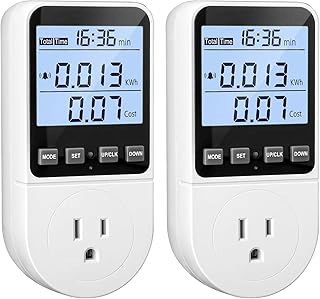
Watt Meter Power Meter Plug Electricity Usage Monitor with Backlight and Overload Protection
Measuring actual appliance draw is the most reliable way to build a load inventory, and the Watt Meter Power Meter Plug Electricity Usage Monitor offers a straightforward plug-and-read approach for homeowners conducting one-time power surveys. This monitor plugs directly between the wall outlet and your appliance, displaying real-time wattage on a backlit screen that remains readable in dim utility rooms or under-cabinet spaces.
The built-in overload protection adds a safety margin when testing higher-draw devices like space heaters or power tools, shutting down the meter before circuit limits are exceeded. At $18.99, this entry-level meter suits users who need to measure a handful of critical appliances - refrigerators, sump pumps, freezers, or entertainment systems - without investing in professional-grade logging equipment.
The interface is simple: plug it in, connect your device, and read the display. The backlight activates with a button press, making it easy to note wattage figures without a flashlight. Because it measures live load rather than relying on nameplate estimates, you'll capture startup surges and idle consumption that nameplate ratings often miss. For backup power planning, this real-world data helps you size battery capacity and inverter output more accurately than guesswork.
This meter works best for stationary appliances that can be unplugged and reconnected. It is less convenient for hardwired devices like HVAC systems or well pumps, which require inline meters or clamp ammeter methods. The 4.5/5 rating reflects consistent performance for household measurement tasks, and the price point makes it accessible for users who need a dedicated tool without multi-function complexity.
- ✅ Backlit display for readability in low-light areas
- ✅ Overload protection prevents circuit overload during testing
- ✅ Plug-and-read operation requires no wiring or setup
- ✅ Measures real-time wattage including startup surges
- ✅ Entry-level price at $18.99
- ⚠️ Not suitable for hardwired appliances without adapter
- ⚠️ Single-outlet design limits simultaneous multi-device testing
- ⚠️ Does not log historical data for long-term analysis
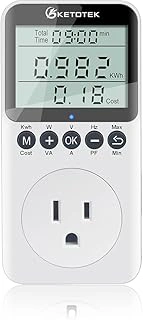
KETOTEK Watt Meter Power Plug Electricity Monitor with LCD Display, Overload Protection
The KETOTEK Watt Meter Power Plug Electricity Monitor offers a straightforward way to measure appliance power draw when calculating backup needs. This plug-through meter displays real-time wattage, voltage, and cumulative kilowatt-hours on its LCD screen, letting you track how much energy each device pulls over time. The built-in overload protection adds a layer of safety when monitoring high-draw appliances.
Priced at $16.19, this meter sits slightly below similar models while carrying a 4.6 out of 5 rating. That combination makes it a practical choice if you're measuring multiple circuits at once or want a backup unit to monitor several appliances simultaneously without moving a single meter around. The display shows the same core metrics - watts, volts, amps, and accumulated watt-hours - that you need to build an accurate load profile for your home backup system.
The main tradeoff is feature depth: this meter handles the essentials but doesn't offer advanced data logging or connectivity. For home backup planning, that's rarely a drawback. You'll get the watt-hour totals and peak wattage readings required to size battery capacity and inverter output. If you need to measure a refrigerator in the kitchen and a sump pump in the basement at the same time, a second meter at this price point keeps the process efficient without doubling your budget.
Check current price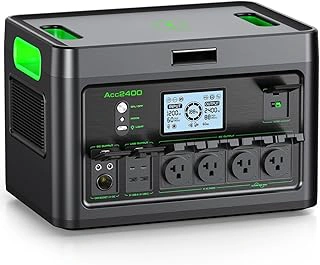
2400W Portable Power Station 1843Wh LiFePO4 Battery with USB-C and 4 AC Outlets
A 2400W portable power station with 1843Wh of LiFePO4 battery capacity serves as a practical example of the sizing calculations outlined earlier. This unit's 1843Wh usable capacity translates directly to the watt-hour totals you calculate when adding up your appliance loads and desired runtime - if your worked example showed a need for roughly listed-capacity over an evening, this station fits that profile.
The LiFePO4 chemistry supports deeper discharge cycles than older lithium-ion designs, meaning you can safely use a higher percentage of the stated 1843Wh without compromising long-term battery health. The 2400W continuous output handles surge-heavy appliances like refrigerators or sump pumps that momentarily pull more than their running wattage, and the four AC outlets let you distribute multiple loads simultaneously without needing splitters or adapters.
At $559.99, this mid-capacity station balances upfront cost against runtime: it won't power a whole-home setup for days, but it covers essential circuits - refrigerator, modem, lighting, and a laptop - through a typical overnight or storm outage. The built-in USB-C port adds direct device charging without tying up AC outlets, keeping your watt-hour budget focused on higher-draw appliances. If your calculated needs land near listed-capacity and you prioritize portability over hardwired installation, this unit aligns with the worked example and provides a concrete capacity reference for real-world backup planning.
- ✅ 1843Wh usable capacity matches mid-range backup calculations
- ✅ LiFePO4 chemistry supports safe deep discharge
- ✅ 2400W output handles surge loads from refrigerators and pumps
- ✅ Four AC outlets plus USB-C port for simultaneous device charging
- ⚠️ Mid-capacity design limits multi-day runtime for larger households
- ⚠️ Portable form factor may lack hardwired integration features
Step 1: Inventory Your Critical Loads
- List every appliance or device you need during an outage
- Find the wattage rating on each device label or manual
- For motor-driven appliances, note startup surge watts if listed
- Separate always-on loads from intermittent-use devices
- Record whether each device is essential, preferred, or optional
Common Mistakes That Lead to Undersized Systems
- Using nameplate watts instead of measured actual draw
- Ignoring startup surge for motor loads like refrigerators and pumps
- Forgetting inverter efficiency losses in the calculation
- Planning to use 100% of battery capacity instead of safe depth of discharge
- Assuming all loads run simultaneously when some cycle on and off
- Not accounting for seasonal changes in refrigerator or heating loads